![EE_logo_darkBackground.png]](https://support.encentivenergy.com/hs-fs/hubfs/Branding%20Images%20-%20Logos%20and%20Icons/EE_logo_darkBackground.png?height=40&name=EE_logo_darkBackground.png)
Get started in 3 steps
1. Sign in. Open the UtilityGenius agent in Copilot to sign in.
-
- For new UtilityGenius users, choose Sign in with Microsoft, using your work Microsoft account. This will automatically create a UtilityGenius account and provide you access!
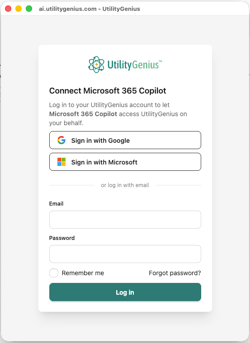
- For existing UtilityGenius users, input your email and password associated with your UtilityGenius account to login.
- Place: one utility, one zip code or one state
- Product: one specific product category, such as High-Bay Luminaires or Ductless Mini-Split Heat Pumps
- Ask: what you want back, such as a list, a ranked table, a rebate estimate or program rules
3. Follow up to build it out. Add the next state, product or utility one at a time, then ask Copilot to combine everything into one table.
Want ready-made prompts? Our Copilot Prompt Library for Manufacturer Sales Reps has tested, copy-and-paste prompts for common sales tasks.
The prompt formula in action
Too broad: "What are the best LED rebates in the Northeast?"
Copilot-friendly: "For [High-Bay Luminaires] in [Pennsylvania], list each utility's prescriptive rebate. Show the utility, program name, rebate range and what the rebate is paid per (fixture, kW or kWh)."
Follow-up: "Now do the same for [New Jersey]." Then: "Put both states in one table."
The second version names one place, one product and exactly what to return, so Copilot can pull a complete, accurate answer.
Tips for better answers
- Pick one product and one place per prompt. Copilot handles short, specific questions much better than broad ones. Add more states or products with follow-ups.
- Name the states. Copilot doesn't understand regions like "Northeast," "the Northwest". List the states instead.
- Use the exact product name. Specific categories ("High-Bay Luminaires," "Networked Lighting Controls") work better than general terms ("LEDs," "controls"). If you mean one type, say what to leave out, such as "don't count thermostats."
- Say which kind of rebate you want. Use "instant (midstream)" for discounts taken at the distributor, "prescriptive (downstream)" for rebates the customer applies for after purchase, and "custom" for project-specific incentives based on energy savings.
- Ask how each rebate is paid. Some rebates are paid per fixture or unit, others per kW or kWh saved. Asking keeps Copilot from treating a per-kW rate as a per-fixture amount.
- Ask for one program detail at a time if something comes back blank. If pre-approval, deadlines or inspection requirements are missing, ask for that detail on its own.
- Check the count. If a list looks short, ask: "Is that every utility in [state]? How many are there in total?"
- Paste zip codes in small batches. Up to about 10 at a time, then ask about each utility separately.
What to know about Copilot's limits
- Large, multi-state questions. Prompts that cover many states, whole regions or the entire country work in other AI tools such as ChatGPT, Claude and Gemini, but in Copilot they often come back with errors. This is due to Copilot’s built in query limitations for their add-on agents. As we continue to work on a solution to remedy this through Copilot, we recommend following the guidelines above for the best results.
- No files, maps or charts. Copilot has limitations around the outputs they are able to create such as building a spreadsheet, heat map or chart from UtilityGenius data. Ask for a table instead and paste it into Excel, Word or PowerPoint. For a visual rebate map, use the map view in UtilityGenius.
- Proposals. Copilot doesn't reliably edit an attached proposal. For best results, ask Copilot to write the rebate section, then paste it in yourself.
Sign-in troubleshooting
- "Invalid email or password": make sure you choose Sign in with Microsoft, not the email-and-password option.
- Asked to sign in again: Copilot may ask you to sign in to UtilityGenius again after a few prompts. This is due to Copilot’s security settings. If this happens, simply sign back in and re-run your prompt.
- Agent missing or out of date after an update: Please restart your Teams app to reset.
- Still stuck? Contact us at support@utilitygenius.com and we'll walk through it with you.
Always verify before you quote
UtilityGenius data is verified by our in-house team, but AI tools can still summarize it based on their own rules. Before sharing a rebate amount with a customer, confirm the program, rate and eligibility rules using the program link in the answer or in UtilityGenius.